

Postpone lets you schedule posts to multiple subreddits and Reddit profiles from a single page. Here's how the Reddit scheduling form works.
Creating a Post
- Click New Post in the top-left corner of any page.
- Select your Reddit Account.
- Choose a post type: Text, Link, or Image/Video.
- Enter your title and post content (media, text, or link).
- Add one or more subreddits to submit to.
- Choose a date and time for each submission.
- Click Schedule Post.
Post Types
- Text — A self-post with a title and optional body text.
- Link — A post with a title and URL. You can optionally add body text.
- Image/Video — Upload images, GIFs, or videos. Gallery posts support up to 20 images. You can optionally add body text.
Post Options
When scheduling a Reddit post, you can configure the following options:
| Option | Description |
|---|---|
| NSFW | Mark the post as Not Safe For Work. |
| Spoiler | Mark the post as containing spoilers. |
| First comment | A comment to post on your submission. Postpone shows it with a copy button when you post on Reddit, so you can paste it in after submitting. |
Subreddit Submissions
Each subreddit you add becomes a separate submission. For each submission you can configure:
- Flair — Select a link flair if the subreddit supports or requires it. You can set a default flair per subreddit.
- Scheduled date and time — Each subreddit can be scheduled at a different time.
- Title override — Use a different title for a specific subreddit.
- Comment override — Use a different first comment for a specific subreddit.
Scheduling to Multiple Subreddits
When posting to multiple subreddits, use the auto-space feature to automatically space submissions apart by a set interval (e.g., every 15 minutes). This helps avoid triggering Reddit's spam filters.
You can also click the labels button (the tags icon next to the Subreddits heading) to quickly add all subreddits with a specific label from the Subreddit Manager.
Posting to Your Reddit Profile
You can schedule posts directly to your Reddit profile, which notifies your followers of new content.
- Create a post following the steps above
- In the Subreddit field, choose /u/<Your-Account>'s Profile (listed first in the dropdown).
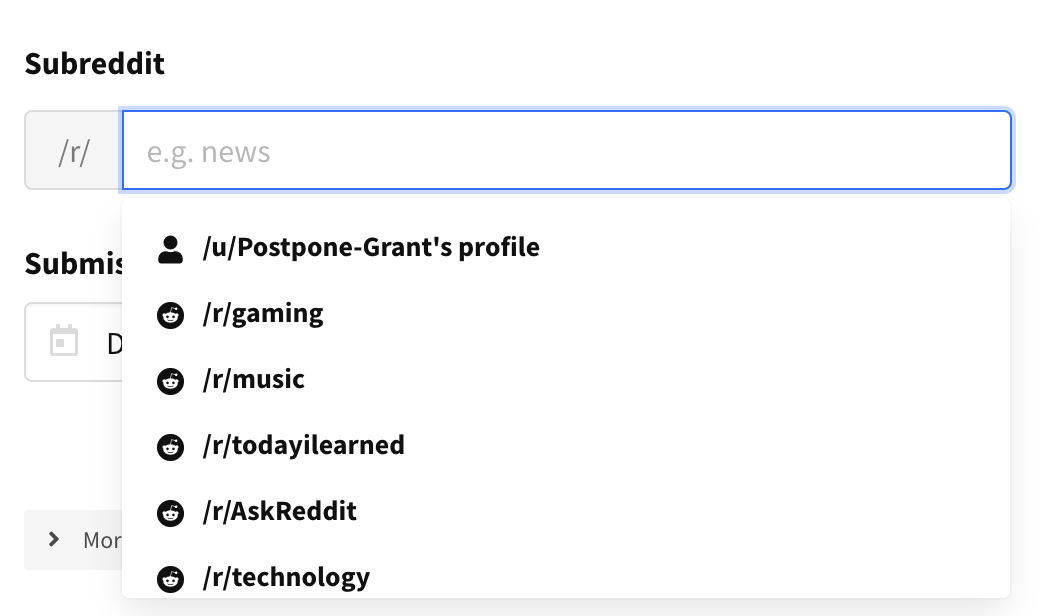
- Complete your post details and click Schedule Post.
Supported Features
Everything Postpone supports when scheduling to Reddit:
- Text, link, and image/video posts — Schedule a self-post, a link post, or a direct media upload, each with an optional body and first comment.
- Galleries — Upload up to 20 images in a single gallery post.
- Multiple subreddits per post — Add up to 100 subreddits to one post, each publishing as its own submission.
- Profile posts — Schedule to your own Reddit profile so your followers are notified.
- Per-subreddit scheduling — Give every subreddit its own date and time instead of publishing them all at once.
- Auto-spacing — Space every submission apart by a fixed interval in one click, which helps avoid Reddit's spam filters.
- Title and comment overrides — Submit a different title or first comment to a specific subreddit without changing the rest of the post.
- Link flair — Pick a subreddit's link flair, including a default flair you save per subreddit.
- NSFW and spoiler flags — Mark the post as Not Safe For Work or as containing spoilers.
- Subreddit labels — Add every subreddit carrying a label from the Subreddit Manager in one click.
- Post requirement checks — Postpone checks each subreddit's rules before you schedule and warns you about problems like title requirements, missing flair, or disallowed post types and domains, which you can review or override.
- Subreddit frequency warnings — Get warned when you're posting to the same subreddit, or from the same account, more often than your configured interval. See Subreddit Frequency Warnings.
- Repost protection — Get warned when you're about to submit media you've already posted to that subreddit. See Repost Protection.
- Spintax — Randomize your title across subreddits with spintax. See Spintax.
- Post templates — Save a reusable set of subreddits, titles, and settings. See Post Templates.
- AI title writer — Generate Reddit titles tailored to the subreddit. See Creating Reddit Titles.