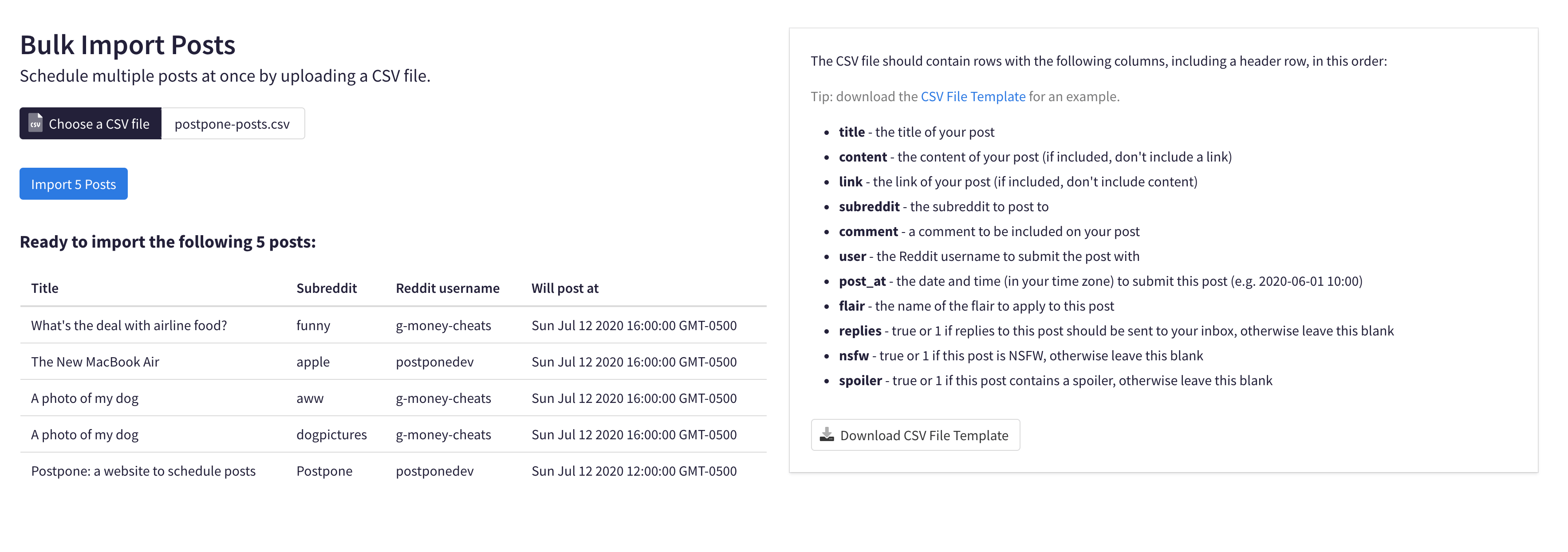
Bulk Import is a Postpone feature enabling users to import and schedule dozens or even hundreds of posts all at once. It allows managing Reddit posts from spreadsheets and works with all Postpone plans.
Download Template Spreadsheet
Visit the Bulk Import page to download CSV templates for either individual posts or Post Templates format. Templates include columns and examples for scheduling different content types.
Fill Out the Spreadsheet
Open the CSV file in your spreadsheet software, then add rows for each post with your desired content.
Importing Individual Posts
Content Configuration
The link_or_media column handles external links (like blog posts) or Content Library files. Images can upload to Imgur via the imgur value in the upload_to column.
Comments
Include post-submission comments in the comment column.
Account Selection
Specify Reddit accounts using the account column.
Subreddit Posting
Use the subreddit column. For profile posts, use the u_{username} format.
Scheduling
The post_at column requires YYYY-MM-DD HH:MM format or keywords like:
best_todaybest_4_daysbest_2022-11-06queue_next— the next open slot on the Reddit account's schedule. Rows that make up one post share a single slot and are spaced 20 minutes apart behind it. See Scheduling with the Account Queue.
Flair
Enter exact flair names in the flair column.
Post Settings
Use 1 in the nsfw column to mark a post as NSFW.
Post Templates Import
A simpler format requiring title, link or content, optional comment, and template name. Postpone applies template settings (subreddits, flair, timing).
Export to CSV
Microsoft Excel
Use File > Save As and select CSV format.
Apple Numbers
Use File > Export To > CSV.
Upload Process
Upload your CSV at Postpone's Bulk Import page. The system displays a preview before final import.