

Postpone supports two posting methods:
- Automatic -- posts are submitted by Postpone automatically.
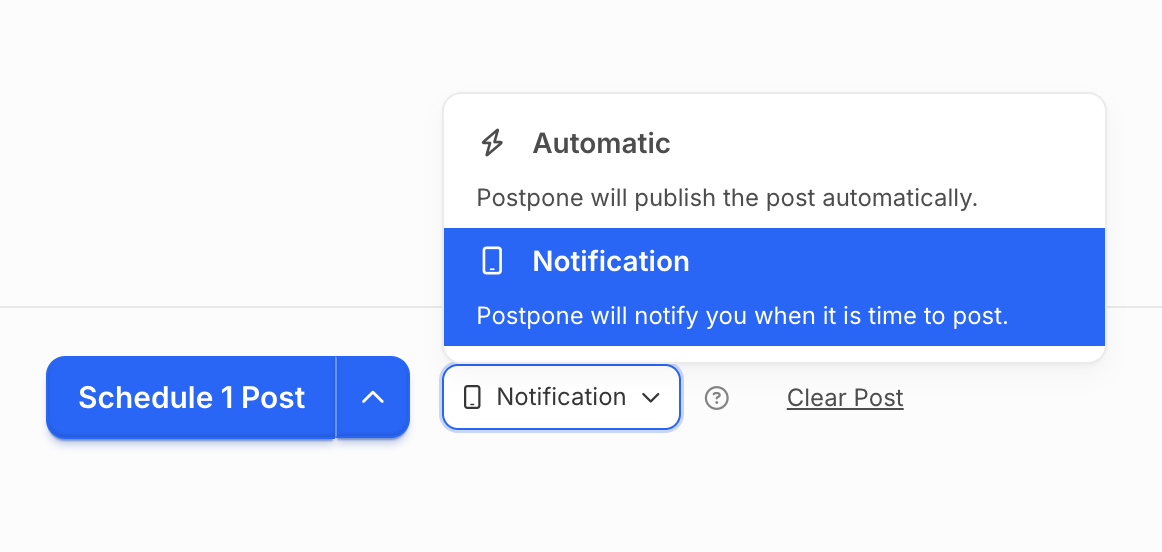
- Notification -- Postpone alerts you when it's time to post, so you can submit the post yourself.
Notification posting is available for Reddit, Instagram, Facebook, TikTok, and YouTube Shorts.
What is Notification Posting?
Postpone sends you a notification when it is time to post, so you can submit the post yourself rather than auto-posting directly to platforms.
Why Use Notification Posting?
For Reddit
- Increased post engagement (upvotes and views)
- Reduced risk of shadowban or suspension
- Submit videos to all subreddits via the official mobile app
For Other Platforms (Instagram, TikTok, Facebook, YouTube Shorts)
- Access platform-exclusive features such as Instagram Story links, TikTok music, and editing tools
Postpone Features Retained
Even with notification posting, you still have access to all of Postpone's features:
- AI-Powered Content Creation
- Strategic Planning Calendar
- Content Library
- Best Time to Post recommendations
- Fresh Links tool
- Reddit Analytics
- Subreddit Manager
- Redditor Analysis
- Subreddit Discovery
- Content Repost Protection
- Subreddit Frequency Warnings
How to Create Notification Posts
- Create your post in Postpone.
- Choose a date and time.
- Select Notification instead of Automatic.
- Click Schedule Post.
Notification Delivery
Notifications arrive via:
- iPhone or Android device
- Web browser
Requirements
- Latest Postpone app installed (iPhone or Android)
- Account logged in
- Notifications enabled in device settings
- Device nearby at scheduled times
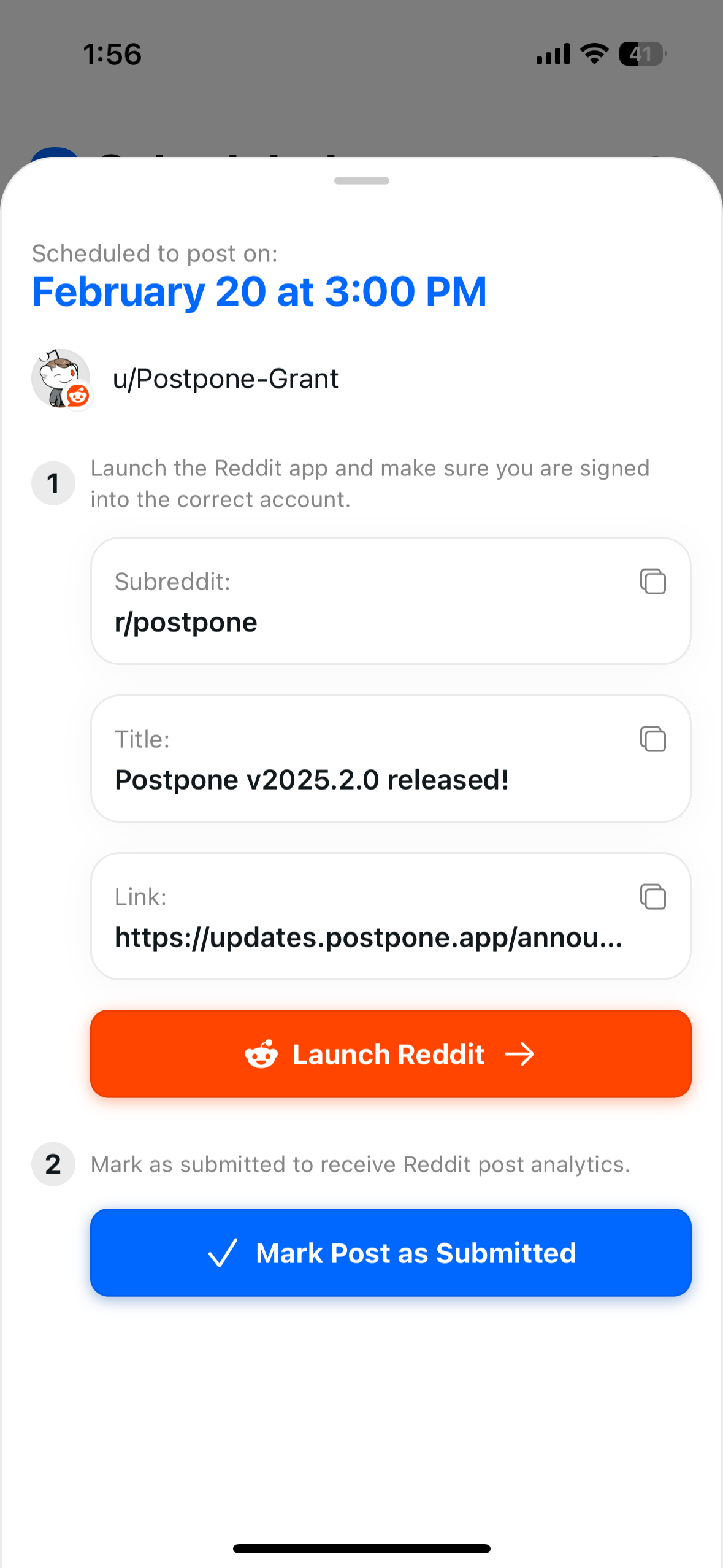
When you receive a notification, tap it to open the post in Postpone. From there you can copy the fields, open the platform app, and publish. Mark submissions in the app so Postpone can track your analytics.
Per-Device Notification Configuration
If you have multiple devices, you can choose which accounts send notifications to each device. This lets you route notifications for different accounts to different phones or tablets.
To configure per-device notifications, go to Settings > Devices & Browsers, select a device, and choose which accounts should send notifications to it. See Devices & Push Notifications for full details.
Troubleshooting Mobile Device Notifications
If you're not receiving notifications on your phone or tablet, work through the following checks.
Confirm the Postpone App Is Installed and Logged In
Notifications are delivered through the Postpone mobile app. Make sure you have the latest version installed (iPhone or Android) and that you are logged in to your Postpone account.
Verify Your Device Appears in Settings
Go to Settings > Devices & Browsers on Postpone's website. Your phone should appear under Mobile Devices. If it does not, open the Postpone app on your phone and log in again — the device registers automatically.
Enable Notifications for the Postpone App
iOS
- Open the Settings app on your iPhone.
- Scroll down and tap Postpone.
- Tap Notifications.
- Make sure Allow Notifications is turned on.
- Confirm that Lock Screen, Notification Center, and Banners are enabled.
Android
- Open Settings on your Android device.
- Tap Apps (or Apps & notifications).
- Find and tap Postpone.
- Tap Notifications and make sure notifications are enabled.
- Ensure the notification channel is not set to Silent.
Disable Focus Mode or Do Not Disturb
Focus modes and Do Not Disturb can silently block notifications.
- iOS -- Open Control Center and check whether a Focus mode (e.g., Do Not Disturb, Sleep, Work) is active. If so, either disable it or add Postpone to the Focus mode's allowed apps under Settings > Focus.
- Android -- Open Settings > Sound & vibration > Do Not Disturb and make sure it is off, or add Postpone as an exception.
Check That the Right Accounts Are Selected
On the Settings > Devices & Browsers page, click the edit icon in the Accounts column for your device. Make sure the social accounts you expect notifications from are selected.
Additional Mobile Checks
- Battery optimization (Android) -- Some Android manufacturers aggressively restrict background activity. Go to Settings > Battery > Postpone and select Unrestricted (or disable battery optimization for the app).
- Background App Refresh (iOS) -- Go to Settings > General > Background App Refresh and make sure it is enabled for Postpone.
- Stable internet connection -- Notifications require an active network connection to be delivered. Verify that your device has Wi-Fi or cellular data enabled.
Troubleshooting Browser Notifications
If you're not receiving notifications in your web browser, work through the following checks.
Confirm Your Browser Is Registered
Go to Settings > Devices & Browsers on Postpone's website. Your browser should appear under Web Browsers. If it does not, click Enable notifications for this browser and accept the permission prompt.
Allow Browser Notifications in System Settings
Even if Postpone has notification permission in the browser, your operating system can block browser notifications at the system level.
macOS
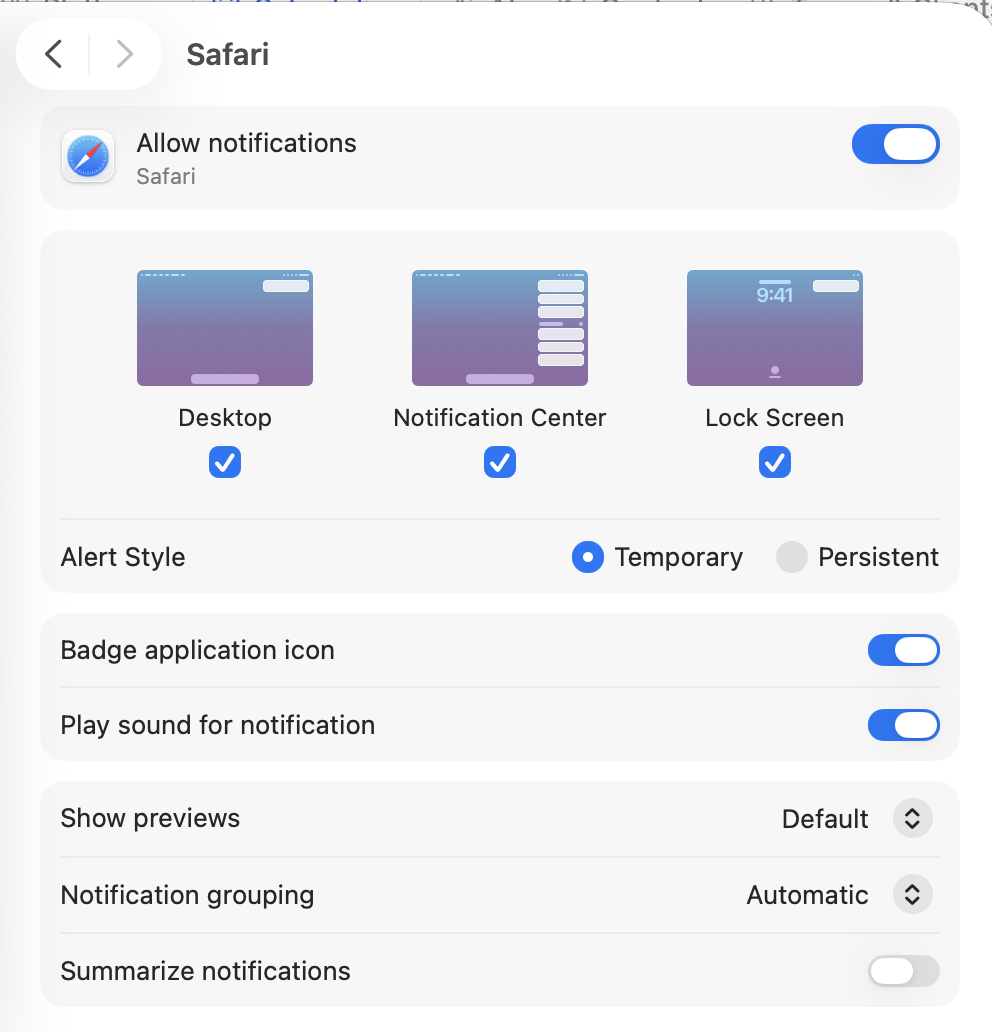
- Open System Settings > Notifications.
- Find your browser (e.g., Chrome, Firefox, Safari, Arc, Brave) in the application list.
- Make sure Allow Notifications is turned on.
- Confirm that notification style is set to Banners or Alerts, not None.
- If you use Focus modes, make sure your browser is allowed to send notifications during active Focus sessions.
Windows
- Open Settings > System > Notifications.
- Make sure Notifications is toggled on at the top.
- Scroll down to find your browser and make sure its notifications are enabled.
- If you use Focus assist (or Do not disturb on Windows 11), either turn it off or add your browser to the priority list.
Allow Notifications in Browser Settings
Chrome
- Click the lock icon (or tune icon) in the address bar on any Postpone page.
- Make sure Notifications is set to Allow.
- Alternatively, go to
chrome://settings/content/notificationsand check that Postpone is not in the Block list.
Firefox
- Click the lock icon in the address bar on any Postpone page.
- Under Permissions, make sure Send Notifications is set to Allow.
- Alternatively, go to
about:preferences#privacy, scroll to Permissions > Notifications, and confirm Postpone is allowed.
Safari
- Open Safari > Settings > Websites > Notifications.
- Find Postpone in the list and set it to Allow.
Brave
Brave requires an extra step: navigate to brave://settings/?search=push and enable Use Google services for push messaging. Then follow the same steps as Chrome.
Check That the Right Accounts Are Selected
On the Settings > Devices & Browsers page, click the edit icon in the Accounts column for your browser. Make sure the social accounts you expect notifications from are selected.
Additional Browser Checks
- Browser must be running -- Browser push notifications are only delivered while the browser is open (it can be in the background, but it cannot be fully quit).
- Send a test notification -- On the Settings > Devices & Browsers page, click the bell icon next to your browser to send a test notification. If the test arrives, your setup is working correctly.
- Multiple browsers -- Each browser is registered separately. If you switched browsers, you need to enable notifications in the new browser as well.
- Incognito / private mode -- Push notifications do not work in private or incognito browser windows.